Showing posts with label Blogger News. Show all posts

Friday, December 6, 2013

Finally PageRank Updated In 6th December 2013

File Under: , 7 comments

Hi Guys, Good news for every bloggers and webmasters.There is a confirmed page rank update by Google on 6th December. Actually most of bloggers and webmasters were waiting for this moment, now its over.Usually page rank get updated with the average of three to four months.But this time took more time to update page rank.Last update was February 2013.Finally, after 10 months Google page rank updated.

Read:  How to Boost Your Page Ranking in 2013
            Awesome SEO Tricks To Boost Website Ranking


Matt Cutts has mentioned that there will no page rank update in 2013.
You can see his tweet below.


How to Check Your Page Rank?


There have lot of tool to check website /blog page rank.Follow these steps.

1. Go to http://www.prchecker.info/
2. Add your URL and click the Check PR
3. Add the Captcha code and click Verify.You will see your PR

This is the latest Google Page rank update. How is your page rank ? share with comments.
Hope you all guys have a good page rank in this time.Happy blogging. :)

Author Bio: Sohan Jayasinghe is the owner and author of Bloggertrix.com .He has been blogging since 2009 and writing Blogger trix since 2010.If you want to contact him, Just leave a message via contact us page.
Read More

Sunday, April 14, 2013

Awesome Improvements For Blogger Template HTML Editor

File Under: , 3 comments

This is a  great news who builds Blog templates or make some changes to existing template for your
blog by using  HTML, Javascript, CSS. Actually ,all of us will interesting to work with new features of our existing HTML Editor. Recently Google works continuously to upgrade more additional feature for blogger. As a result of it,Blogger officially introduced New HTML Editor for blogger dashboard.(Upgraded)

New+blogger+Template+Editor

Improvements For Blogger Template HTML Editor


HTML Templates helps you to change your blog appearance by modifying source code.So,we can customized it as we want. All experienced bloggers know,how was old HTML Editor.Its was bit hard to find exact codes when we need to look for it.I know we can find any code by using "Ctrl+F" But i meant HTML tags are not easy to find(Tags are not highlighting) also. Therefore in this improved HTML editor now Support numbering, Syntax highlighting, auto-indentation and code folding to make editing your template.It become much easier now.

Lets Take a look at new HTML editor


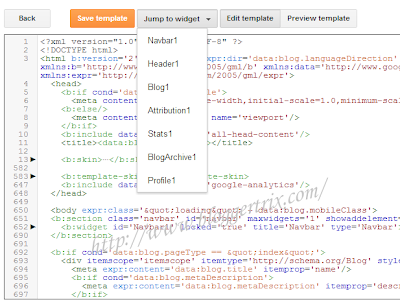
Go to Blogger Dashboard and click Template and click "Edit HTML” button.Now you can see new HTML Editor,
How is it? pretty cool huh?

Bogger+new+HTML+Editor1

You can locate Widget Easily like below

Bogger+new+HTML+Editor1

Expand widget no longer exist.
You can see how widget code are display. You can  click new fold markers ‘►’ and expand widget code.

Bogger+new+HTML+Editor1

New change in Preview template too. You can see preview template button like earlier.Earlier preview displayed with new tab.But new preview shows inside same editor.

Bogger+new+HTML+Editor1

There is a new button called Format template.It helps to cleans up the indentation of the template automatically.And other thing is you can replace text by using Ctrl+Shift+R

Bogger+new+HTML+Editor1

Hope this HTML Editor article will help for beginner and experienced blogger as well.If you have any problem regarding this new features, just leave a comment. Happy blogging.
Read More

Tuesday, February 5, 2013

Google pagerank update 4 February 2013

File Under: 9 comments

Page rank is really important who are running website or  blog.  Actually this  is good   new  for  webmasters. because latest  page rank updated on 4  February 2013 as  we  expected. And  its  a  major Google  page  rank update of 2013. We can see lot of sites, blogs updating their Page rank. Because of the  quality of the contents and  quality of  the  backlinks they  are having for their
blog or website.

Check it how page rank got your website to blog according to Google page rank updating algorithms.
Increase or discrease, If it is Increase or diaereses don't worry about it.Just keep focusing to provide high quality articles and try to get high quality backlinks (high page rank).

How to check your page rank.
Now days there have lot of tool to check website /blog page rank. So, im recommend this site for check your page rank online.Follow these steps.


2. Add your URL and click the Check PR
3. Add the Captcha code and click Verify.You will see your PR

This is the latest pagerank update.How is your page rank ?  how affect it to your blog because of this Google page rank updating algorithms. All the best and hope you all guys have a good page rank in this time.
Read More

Monday, September 24, 2012

FeedBurner Subscribers Dropped to Zero September 2012

File Under: 1 comment

Yesterday morning when i check my website,I was shock because, My email subscriber count goes to
zero. Therefore FeedBurner  chicklet showing my email subscriber 0  readers.There was over 1000
readers earlier.Actually I don't have any idea, why suddenly subscriber had come down to zero.Because Google not inform about this before happen. i think all of site owners faced this problem.This is temporary, Google will fix this problem as soon as they can. Just relax.

feedburner-zero
However feedburner process runs as usual. visitors can subscribe via feedburner. If you are think your website visitors discourage about seening this, you can remove chicklet.Actually, One thing you can do for this.You can see your, email subscribers without problem. Just backup it. It will more safe.
You c an follow these steps to backup it.

1. Log in to feedburner

2. Click your feed name.

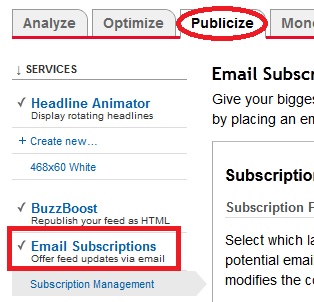
3. Go to Publicize tab.

4. Under service, click Email Subscription like below.

feedburner-subscriber
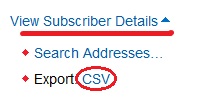
5. Go to bottom of the page and click View Subscriber Details

6. Under  click  Export: CSV it will save to txt file
backup-feedburner

So your feedburner emails are backup successfully. Google will provide a solution for this soon./
we have to just wait for it.If you are got a news about it. let us know. :)
Read More

Tuesday, February 7, 2012

Google page Rank Update February 2012

File Under: , 10 comments

Getting Google page rank is not easy. we have use webmastertools
 and do the SEO well. Today Google updated the pagerank for 2012,
 So you can check your Google Page Rank.
you can use below page rank checker to check your
Google page rank. It will redirect to
prchecker.

Google page Rank Update February 2012

First add site and  click Check PR


Check Page Rank of your Web site pages instantly:


This page rank checking tool is powered by Page Rank Checker service

It will automatically redirect to prchecker.info

After add Anti-bot code show on left.  Now click verify

It will show your page rank.

If you want to display PR on your website. you can add below  code to your blog.
Read More

Monday, July 11, 2011

Blogger Announce Favicon Option For Your Blog

File Under: 2 comments

Most of blogger have custom  favicon,  Earlier
we add favicon with editing Template.
Now blogger gave a good option for you,
we can  Add a favicon easily from your
layout page. Follow below step.


1. Log in to your blogger and Go to Design >> Page Element

2. Now you can see like this,


3. Now click Edit and Export your image  ( Use 16x16 pixel image) as below.


4. Enjoy with adding favicon with  new feature..
Read More

Thursday, July 7, 2011

Get Started With Facebook Video Calls.

File Under: , 1 comment

Now you can Get video calls with Facebook,So it will easy to
 contact with your friend.There have more lot of features,
Best things is they  launching multi-person chat,which is one
 of our most requested features. Now when your friends can't
figure out what movie to see, you can just add them to a chat
and decide together. To include more friends in your
conversation, simply select Add Friends to Chat.


Click here to Start Facebook Video calls

Enjoy with it.
Read More

Monday, June 27, 2011

Google Updated PageRank 2011

File Under: 1 comment

Today Google updated the pagerank, so check your your
pagerank now.you can use below gadget to check your pagerank.


1. First add site and  click Check PR


Check Page Rank of your Web site pages instantly:


This page rank checking tool is powered by Page Rank Checker service
2. After you will go to prchecker.info site

3. After add Anti-bot code show on left.  Now click verify

4. Now you can see your page rank,

Now if you want, you can add PageRank Buttons to your blog.
Read More

Friday, June 3, 2011

How to add Google +1 (plus one) Button to your blogger

File Under: , , , 7 comments

This is a newest Button that the Google announced few day ago.
 It also similar to Facebook like button and twitter button.
You have to log in  Google account to like this button.there have
 different size of Button . add it as your like.
+1 button, google +1 button, new google plus one button
1. Log in to your blogger account and Go to Design >> Edit HTML

2. Put checked marked in Expand Widget Templates

3. Find this tag by using Ctrl+F    </head>

4. Paste Below code before </head> tag

<script type="text/javascript" src="http://apis.google.com/js/plusone.js">
 {lang: 'en-US'} </script>

5. If you want add this button  Below your post title,or below post body.

6. Find this tag by using Ctrl+F   <data:post.body>

7. Paste below code before the <data:post.body>  tag  for add button to below post title
    Paste below code After   the  <data:post.body>  tag  for add button to below your post.

<div style='float:left'>
<g:plusone size="standard" expr:href="data:post.url"/>
</div>
There have different size button, If you want to change button size. Select Button below
and Replace standard word (above code ) with your button size. you can see the button list below.
(small , medium , standard , tall )

+1 button, google +1 button, new google plus one button,newest google button
8. Now you are done. Enjoy with New +1 Button
Read More

Sunday, April 24, 2011

How youtube support to blogger

File Under: , 1 comment

I got some new feature about blog.But this is not Newest one.
I think most of are don't know about this feature.So i hope to 
share it wit you.How you add you tube Video to your post?? 
In my earlier post i was post about how to Add you tube video
 with Embed.It have more step to do.But using this method 
you can add you tube video instantly.ill show how to do it.
Follow it.

1. Log in to Blogger account and Click New post

2. After that click this button that i mention below image.

bloggertrix,youtube blogger,add youtube video to blogger

3. After click it you will see like this dialog box.

bloggertrix,youtube blogger,add youtube video to blogger

4. After appear this, Click from you tube.(If you have you tube account you can
    click My you tube video and import your videos)

5. Now you can search video what you want from typing search area.

6. After select post what you want and click select.

7. After  we can see post like this.

bloggertrix,youtube blogger,add youtube video to blogger

8. You can add text before video and after video ,like you making post.

I think this will helpful to you. good luck
Read More

Wednesday, March 23, 2011

Add new feature "Follow by Email" Gadget to Blogger

File Under: , , 1 comment

Add new feature "Follow by Email" Gadget to Blogger


1. Log in to blogger and Go to  Design>> Page Element.

2.Select "Follow by Email" (New).

3. Now add it to your blog.

4. After you add Result will like this.

You are done.
Read More