
Earlier i posted about more menubars. Actually This is also great menubar, That include some more colors.Its include awesome hover style. It have 5 color styles. you can add it as your your. Follow these step well to add to yourblog.
Menubar Collection

DEMO
1. Log in to blogger account and Go to Design >> Edit HTML
2. Put checked marked in Expand Widget Templates
3. Find this tag by using Ctrl+F /head>
4. Paste below code Before </head> tag
5. Find this tag by using Ctrl+F ]]></b:skin>
6. Paste below code Before ]]></b:skin> tag
7. Now Find this code by using Ctrl+F <div id='content-wrapper'>
8. Paste below code Before <div id='content-wrapper'> code
*Replace # With your URL
*Replace Name with as your like.
9. To change the style, you have to replace <div class="lavalamp dark"> with below styles

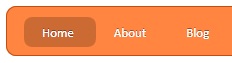
<div class="lavalamp orange">


 <div class="lavalamp cyan">
10. Now save your template
you are done.
Menubar Collection

1. Log in to blogger account and Go to Design >> Edit HTML
2. Put checked marked in Expand Widget Templates
3. Find this tag by using Ctrl+F /head>
4. Paste below code Before </head> tag
<script src='http://ajax.googleapis.com/ajax/libs/jquery/1.7.2/jquery.min.js' type='text/javascript'/>
<script src='http://bloggertrix.googlecode.com/files/lava-menu.js' type='text/javascript'/>
5. Find this tag by using Ctrl+F ]]></b:skin>
6. Paste below code Before ]]></b:skin> tag
.lavalamp {
    position: relative;
    border: 1px solid #d6d6d6;
    background: #fff;
    padding: 15px;
    -webkit-box-shadow: 0 3px 6px rgba(0,0,0,.25);
 -moz-box-shadow: 0 3px 6px rgba(0,0,0,.25);
    border-radius : 10px;
    -moz-border-radius : 10px;
    -webkit-border-radius : 10px;
    background : -webkit-gradient(linear, left top, left bottom, from(rgb(240,240,240)), to(rgb(204,204,204)));
    background : -moz-gradient(linear, left top, left bottom, from(rgb(240,240,240)), to(rgb(204,204,204)));
 height: 18px;
        font-family: calibri;
}

.magenta {
 background : rgb(190,64,120);
 background : -webkit-gradient(linear, left top, left bottom, from(rgb(190,64,120)), to(rgb(177,24,91)));
 background : -moz-gradient(linear, left top, left bottom, from(rgb(190,64,120)), to(rgb(177,24,91)));
 border: 1px solid #841144;

}

.cyan {
 background : rgb(64,181,197);
 background : -webkit-gradient(linear, left top, left bottom, from(rgb(64,181,197)), to(rgb(7,165,187)));
 background : -moz-gradient(linear, left top, left bottom, from(rgb(64,181,197)), to(rgb(7,165,187)));
 border: 1px solid #2f8893;

}

.yellow {
 background : rgb(255,199,79);
 background : -webkit-gradient(linear, left top, left bottom, from(rgb(255,199,79)), to(rgb(255,188,43)));
 background : -moz-gradient(linear, left top, left bottom, from(rgb(255,199,79)), to(rgb(255,188,43)));
 border: 1px solid #c08c1f;

}

.orange {
 background : rgb(255,133,64);
 background : -webkit-gradient(linear, left top, left bottom, from(rgb(255,133,64)), to(rgb(255,107,24)));
 background : -moz-gradient(linear, left top, left bottom, from(rgb(255,133,64)), to(rgb(255,107,24)));
 border: 1px solid #c04f11;

}

.dark {
 background : rgb(89,89,89);
 background : -webkit-gradient(linear, left top, left bottom, from(rgb(89,89,89)), to(rgb(54,54,54)));
 background : -moz-gradient(linear, left top, left bottom, from(rgb(89,89,89)), to(rgb(54,54,54)));
 border: 1px solid #272727;

}

.magenta li a , .cyan li a, .yellow li a , .orange li a, .dark li a{
 color: #fff;
 text-shadow: 0 -1px 0 rgba(0,0,0,.40);

}

.lavalamp a {
    text-decoration: none;
    color: #262626;
    line-height: 20px;
}

.lavalamp ul {
    margin: 0;
    padding: 0;
    z-index: 300;
    position: absolute;
}

.lavalamp ul li {
    list-style: none;
    float:left;

    text-align: center;
    }

.lavalamp ul li a {
    padding: 0 20px;
    text-align: center;
    }

.floatr {
    position: absolute;
    top: 10px;
    z-index: 50;
    width: 70px;
    height: 30px;
    border-radius : 8px;
    -moz-border-radius : 8px;
    -webkit-border-radius : 8px;
    background : rgba(0,0,0,.20);
    -webkit-transition: all .4s ease-in-out;
    -moz-transition: all .4s ease-in-out;
}
7. Now Find this code by using Ctrl+F <div id='content-wrapper'>
8. Paste below code Before <div id='content-wrapper'> code
<div class="lavalamp dark">
 <ul>
  <li class="active"><a href="">Home</a></li>
  <li><a href="#">About</a></li>
  <li><a href="#">Blog</a></li>
  <li><a href="#">Services</a></li>
  <li><a href="#">Portfolio</a></li>
  <li><a href="#">Contacts</a></li>
  <li><a href="#">Back to Article</a></li>
  <li><a href="#">How it Works?</a></li>
 </ul>
 <div class="floatr"></div>
</div>
*Replace # With your URL
*Replace Name with as your like.
9. To change the style, you have to replace <div class="lavalamp dark"> with below styles
<div class="lavalamp magenta">
<div class="lavalamp orange">
<div class="lavalamp yellow">
<div class="lavalamp dark">
10. Now save your template
you are done.


content wrapper is not found in template
ReplyDelete@Geek Addiction
ReplyDeletewhats is your blog URL?
you can add it as add gadget.
Click Add Gadget and select 'HTML/Javascript'and paste 8th step code.
This comment has been removed by the author.
ReplyDelete@Sie Cajilig
ReplyDeleteyes you can, if you can provide your hex color code,i provide new code.
can u help me. i am unable to add this menu in my blog it shows this error 'The content of elements must consist of well-formed character data or markup. Error 500'. i am using your css sprites in my blog, i want to remove it and add this one. My blog ls 'n-droidGamer.blogspot.com'
ReplyDelete@Anonymous
ReplyDeleteCan you contact me on "Contact Me" page?
I'll do it for you.
ok thanks in advance, i have send you mail from 'contact us' page :)
ReplyDeletecool menu thanks!! how do i insert link in it. I have a label named 'blog' and i want the posts in 'blog' label to be shown when clicked on blog in menu. I inserted this 'label/blog' in blog menu but it is not clickable.
ReplyDeletelinks inserted in this menu doesnt work/not clickable. do you have any solution.
ReplyDelete@Anonymous
ReplyDeleteWhat is your glog URL?
'n-droidgamer.blogspot.com' i have placed link in application and games in this menu but it doesnt open.
ReplyDelete@Anonymous
ReplyDeleteI checked your blog.seems to be, you not added the URL on proper place. Contact me on contact Us page.
I will help you..
In your menu demo the links doesn't work.
ReplyDeleteIt has small problem with width. but code is work fine :)
Deletethanks
ReplyDelete